Quick context: This article is designed for practical action. Read it once, then apply one strategy today.
How to Stop Checking Your Phone First Thing in the Morning
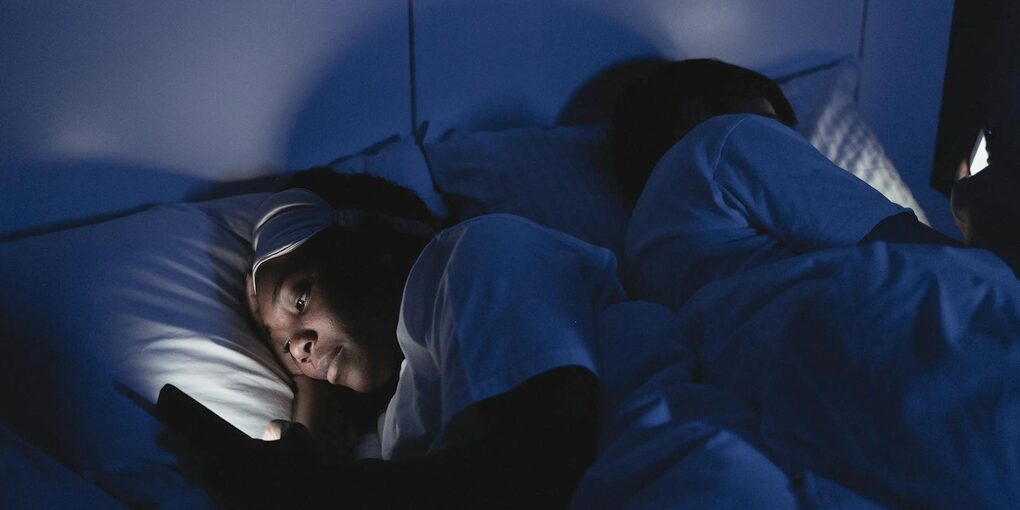
If you’re reading this, you probably already know the feeling. The alarm goes off, your hand reaches for the phone, and before you’ve even sat up, you’re scrolling through notifications, emails, maybe the news. Twenty minutes vanish. You haven’t had a sip of water, but you already know what your coworker posted on Instagram.
Most of us do this. It’s almost reflexive at this point. But if you’ve ever noticed that your mornings feel rushed, scattered, or slightly anxious for no clear reason — your phone habit might be a bigger factor than you think.
Here’s what we’ve found works for building a calmer, more focused morning, without turning it into some elaborate self-improvement project.
What’s Actually Happening When You Grab Your Phone
It helps to understand why this habit sticks so well.
When you wake up, your brain is still transitioning out of sleep. It’s in a kind of open, receptive state. Reaching for your phone in that window floods it with dopamine hits and stimulation before you’ve had a chance to fully come online. Your brain quickly learns to crave that morning hit.
On top of that, whatever you see — a stressful email, bad news, a passive-aggressive text — triggers a cortisol response before you’re mentally ready for it. You end up starting your day already in reaction mode, playing catch-up with other people’s agendas instead of thinking about your own.
And then there’s the attention cost. That early barrage of information fragments your focus in a way that’s hard to recover from. You might not connect the dots, but that foggy, scattered feeling at 10 AM can often trace back to the first five minutes after you opened your eyes.
Building a Phone-Free Morning (Without Overthinking It)
You don’t need a rigid protocol. You just need a few practical changes that make it easier to leave your phone alone and do something better with that first stretch of the day. Here’s what works.
Ditch the Phone Alarm
This is the single most effective change. If your phone is your alarm clock, you’re going to check it — full stop. Buy a cheap alarm clock (seriously, they’re $10-15) and start charging your phone in another room overnight. Kitchen counter, living room, wherever. Just not your nightstand.
If you put the alarm clock across the room, you also solve the snooze problem. You have to physically get up to turn it off, and once you’re up, you’re up.
Set Up Your Nightstand for a Better Start
The night before, leave a few things within arm’s reach: a glass of water, a journal and pen, maybe a book you’re working through. The idea is simple — when you wake up and reach for something, there’s actually something good to reach for.
This kind of small environmental tweak matters more than motivation. When the easy thing to do is also the good thing to do, you don’t need willpower.
Your First Few Minutes
Once you’re awake, keep it low-key:
- Stretch a bit while still in bed. No rush.
- Sit up. Take a few slow breaths.
- Drink that water. (You’re dehydrated after sleeping — it genuinely helps you feel more alert.)
- Jot down a couple of things you’re grateful for, or just your top priorities for the day.
This doesn’t need to take more than five minutes. The point isn’t to build an elaborate ritual — it’s to give your brain a few minutes to wake up on its own terms before you hand it over to your inbox.
Move Your Body, Even a Little
Five to ten minutes of movement before you look at a screen makes a noticeable difference. It doesn’t have to be a workout. Stretch, do some yoga, walk around the block, dance to a song you like. Whatever gets you out of your head and into your body. You’ll feel more awake than any amount of scrolling would have made you.
Do One Quiet Thing
Before screens enter the picture, spend a few minutes on something that’s just… calm. Meditate if that’s your thing. Read a few pages of a book. Make your coffee or tea and actually pay attention to it — the warmth, the taste, the quiet.
This might sound small, but there’s a real difference in how the rest of your day feels when you start it from a settled place instead of a stimulated one.
Know Your Priorities Before You Check In
Before you pick up the phone, take two minutes to write down what actually matters to you today. What’s the one thing you need to get done? How do you want to feel? When you open your phone with that clarity already in place, you’re much less likely to get pulled into whatever comes at you.
When You Do Check Your Phone, Do It on Purpose
Once you’ve given yourself at least 30 minutes (longer is better, but 30 is a solid start), go ahead and check your phone — but do it deliberately. Give yourself a window, maybe 10 minutes. Know what you’re checking for. Process what needs processing, then put it down and get into your day.
The difference between a conscious check and an automatic scroll is night and day.
What a Phone-Free Morning Actually Looks Like
Here’s a realistic example:
- 6:30 — Alarm goes off. Get up, turn it off.
- 6:32 — Stretch, drink water, scribble a few gratitudes or priorities.
- 6:37 — 10 minutes of stretching or a quick walk.
- 6:47 — Sit quietly for a few minutes. Breathe. Read a page or two.
- 6:55 — Make breakfast. Eat it without a screen in front of you.
- 7:15 — Shower, get ready.
- 7:30 — First intentional phone check, 10 minutes max.
- 7:40 — Start your actual work, beginning with your top priority.
That’s about an hour of phone-free time. And honestly? After a few days, it starts to feel less like discipline and more like relief. The quiet is surprisingly nice once you get used to it.
When It Feels Hard
”My phone calms my morning anxiety.”
That’s worth looking at honestly. Scrolling doesn’t actually calm anxiety — it distracts from it, which isn’t the same thing. If mornings feel anxious, try addressing that directly: a few minutes of deep breathing, writing down what’s on your mind, or some movement to discharge that nervous energy. These things actually help. The phone just delays the feeling until later.
”What about work emergencies?”
Real emergencies that can’t wait 30 minutes are extremely rare. If you’re worried, set a specific check-in time — say, 30 minutes after waking — and let your team know you’re reachable by phone call for anything truly urgent. You’ll still respond fast enough. The difference is you’ll be choosing when to engage, not doing it on autopilot.
”I get bored without it.”
That’s actually a good sign. That restless, bored feeling is just what stillness feels like when you’re not used to it. It passes. And on the other side of it is where a lot of your best thinking happens — the ideas, the clarity, the creative problem-solving that can’t surface when your attention is constantly occupied.
”I’ve tried before and it didn’t stick.”
Start smaller. Even 15 minutes of phone-free time in the morning is a real improvement. Keep your phone in another room — that physical barrier does a lot of the heavy lifting. And write your morning routine down somewhere visible so you don’t have to think about it when you’re groggy.
If you want some extra support, Pawse can help by surfacing a gentle reminder right when you reach for your phone — a moment of awareness before the habit takes over.
Using Apps to Enforce a Phone-Free Morning
The strategies above work well on their own, but if you’ve tried the willpower-only route and it keeps failing, adding app-level enforcement can make the difference. Here’s how to set it up on each platform.
iOS Focus Mode
iPhones have a built-in tool for this. Go to Settings > Focus > create a new Focus called “Morning.” Set it to activate automatically from your wake-up time until 30-60 minutes later. Under “Allowed Apps,” permit only essentials (Phone, Clock, Maps). Everything else — Instagram, TikTok, email, news — stays blocked until the Focus schedule ends. You can even customize your Lock Screen and Home Screen to show only what you need during morning hours.
Android Digital Wellbeing: Focus Mode
On Android, go to Settings > Digital Wellbeing > Focus Mode. Select the apps you want paused during mornings, then set a schedule. When Focus Mode is active, those apps are grayed out and notifications are silenced. You can still override it with a tap, but the friction of seeing “Paused by Focus Mode” is often enough to interrupt the reflex.
Third-Party Options
If the built-in tools aren’t enough, these apps add stronger friction:
- Freedom: Schedule recurring morning sessions that block distracting apps and websites across your phone and laptop simultaneously. The “Locked Mode” prevents you from turning it off once it starts.
- ScreenZen: Adds a countdown delay before any distracting app opens. During groggy morning hours, even a 10-second wait is enough to make you reconsider.
- Pawse: Creates a mindful pause with a custom message before apps open. Set a morning-specific prompt like “You wanted to wait until 8 AM. Is this the morning you promised yourself?”
The First 30-60 Minutes Rule
Whatever tool you use, the principle is the same: protect the first 30-60 minutes after waking from social media, email, and news. That window is when your brain is most receptive and least defended against the pull of notifications. Once you’ve had time to wake up, hydrate, move your body, and set your own intentions for the day, checking your phone becomes a choice rather than a reflex.
Set your schedule, pick your enforcement method, and commit to it for at least 10 days. By then, the new pattern starts to feel normal.
How Pawse Can Help
Pawse is designed for exactly this kind of morning habit change, and it works differently from hard blockers.
Setting up morning interventions: Configure Pawse to show a pause screen whenever you open social media or news apps during your morning window. The intervention appears instantly — before the app loads — giving you a moment to catch yourself before the scroll starts.
Custom morning messages: Write prompts that speak specifically to your morning context. Something like “You wanted to wait until 8 AM. Still want to check?” or “How’s your morning going without the phone? Keep it up.” These personal messages hit differently than a generic “app blocked” notification because they connect to your own reasons for changing.
How it differs from hard blocking: Pawse never locks you out. You can always tap through and open the app if you genuinely need to. The difference is that you’ll be making a conscious choice rather than acting on autopilot. This matters because hard blocking often creates frustration and resentment — you’re fighting the tool instead of building the habit. With a mindful pause, you’re building the internal awareness that eventually makes the tool unnecessary. Many users find that after a few weeks, they start catching themselves before the pause even appears.
Tracking your progress: Pawse logs how often you open tracked apps and how often the pause made you change your mind. Over time, you’ll see your morning app opens trending down — concrete evidence that the habit is shifting.
Download Pawse free to start building better mornings.
What You’ll Actually Notice
After a week or so of phone-free mornings, most people report feeling clearer-headed, less anxious, and more in control of their day. You might sleep better too, since keeping the phone out of the bedroom improves sleep hygiene as a side effect.
But the thing that surprises people most is how much more time they seem to have. An hour without your phone in the morning feels longer — in a good way — than an hour of scrolling. You’re actually present for it.
Your morning sets the tone for everything that follows. A reactive start tends to produce a reactive day. A calm, intentional start tends to carry forward too. It’s not magic — it’s just momentum. And it starts with leaving the phone in the other room tonight.
Related Reading:
- Stop Scrolling at Night: Sleep-Saving Guide
- How to Stop Reddit Scrolling
- Stop Scrolling TikTok Without Deleting
- How to Stop YouTube Binge Watching
- How to Reduce Screen Time: 10 Science-Backed Strategies
- How to Stop Phone Addiction
- Mindful Tech Interventions vs App Blocking
Take our free Phone Addiction Quiz to assess your morning habits and get personalized recommendations.
Keep Reading

